
GCSE Maths Practice on iPad & Tablet

esheets.io was built for screens, not printers. Every worksheet, game and puzzle works straight in your tablet's browser — no app to download, no account for your student to create, no paper to lose. Just tap, practise, and get instant feedback. Whether you're a tutor setting digital homework or a parent looking for something more engaging than a textbook, esheets.io is designed for exactly this.
200+ self-marking worksheets, designed for screens
These aren't scanned PDFs or static images of paper worksheets. Every esheets.io worksheet was purpose-built for electronic completion — students type their answers, hit check, and get instant feedback telling them what they got right and where they went wrong.
With over 200 worksheets covering every major GCSE maths topic — from fractions and percentages to quadratics and trigonometry — there's always something relevant to practise. And because each worksheet regenerates with new numbers every time, students can keep practising the same topic until it clicks, without ever seeing the same question twice.
Games, puzzles and visual tools
Maths practice doesn't have to mean sitting in silence filling in answers. esheets.io includes a growing collection of maths games, puzzles and visual tools that make practice genuinely enjoyable on a tablet screen.
- Zoo Mogul is a great single-player game where students can attempt to design and manage a financially profitable zoo
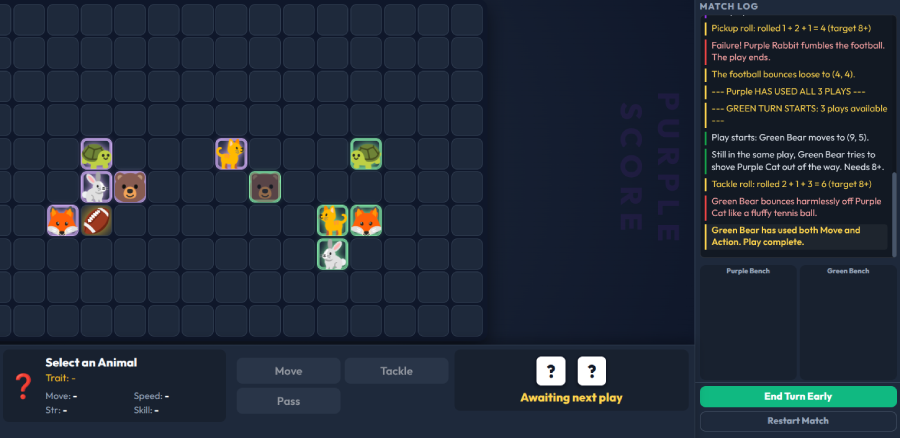
- Furbowl is a superb two-player dice-rolling game that gets maths students thinking about probability and sample space
- Maths Melee can be played by multiple players on either a shared device or remotely
These aren't bolt-on extras - students are practising real skills while they play.
No app. No login. Just a link.
Most digital learning tools come with friction — app store downloads, account creation, forgotten passwords. esheets.io doesn't work like that.
When you set a piece of homework, you get a six-character code. Your student types that code into any browser on any tablet, and their worksheet is ready to go. No account needed. No login. No setup.
For tutors, that means homework actually gets done. For students, it means they're practising maths within seconds of picking up their iPad.
Perfect for tutors setting digital homework
esheets.io was built with private tutors in mind. Setting homework between sessions is one of the most time-consuming parts of tutoring — finding the right topic, printing it out, chasing students to do it, then marking it when they do.
With esheets.io, that whole process takes about thirty seconds. Choose a worksheet, share the code, and the marking takes care of itself. Your student completes it on their tablet, gets instant feedback on every question, and you can see how they got on.
It's homework that works — for you and for them.
Works on any device
iPad, Android tablet, Chromebook, Windows laptop, Mac — if it has a browser, it works with esheets.io. There's nothing to install and nothing to configure. Students can switch between devices mid-session without losing anything.
This makes esheets.io particularly useful for tutors who work with students across different households, where you never quite know what device they'll be sitting in front of.
Start for free today
Explore the full worksheet library, or try the games, puzzles and maths teaching tools — all without signing up. When you're ready to unlock the full teacher toolkit, plans start from just USD 3$ per month.