
Angles on pie charts
Pie charts are a great way to show how something is divided up – like how you spend your day or what people voted for. To make sure each slice is the right size, we need to calculate the angles carefully, since a full pie chart always adds up to 360 degrees. Jump to the questions
Practise now
Worksheet preview and key skills
Worksheet preview
Practise angles on pie charts with this self-marking maths worksheet.
The interactive worksheet below generates questions, gives instant feedback, and lets students record their score.
What you’ll practise
- Using the total frequency.
- Converting frequencies or fractions into angles.
- Using 360° for the whole pie chart.
- Calculating sector angles accurately.
Use the interactive worksheet below, or read the Topic guide for the method and worked example.
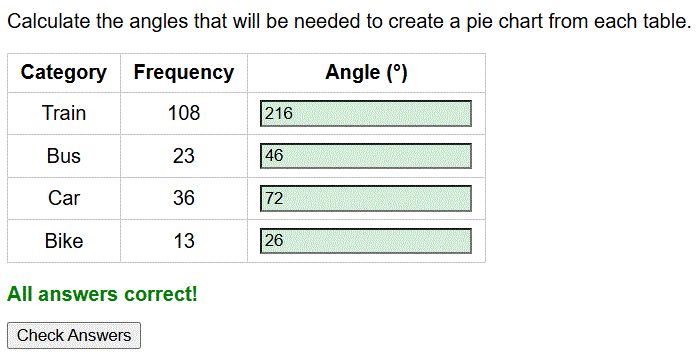
Calculate the angles that will be needed to create a pie chart from each table.
Topic guide
What this worksheet practises
This worksheet provides practice on calculating angles for pie charts. A pie chart represents a whole dataset as a full circle of 360 degrees. To draw one accurately, you must convert the frequency of each category into an angle representing its proportion of the total.
Key method
To find the angle for any section of a pie chart, you need to calculate the multiplier that connects the total frequency to the 360 degrees of the circle.
- First, add up all the frequencies to find the total frequency.
- Second, divide 360 by the total frequency. This tells you how many degrees represent a frequency of 1.
- Third, multiply the frequency of each category by this degree multiplier to find its specific angle.
- Finally, check that all your calculated angles add up to exactly 360 degrees.
Worked example
Draw a pie chart for the favourite colours of 60 students: Red (10), Blue (30), Green (20). Find the angles.
Step 1: Check the total frequency. 10 + 30 + 20 = 60 students.
Step 2: Find the multiplier. Divide the total degrees in a circle by the total students.
360 ÷ 60 = 6 degrees per student.
Step 3: Multiply each frequency by 6 to find the angles.
Red: 10 × 6 = 60 degrees.
Blue: 30 × 6 = 180 degrees.
Green: 20 × 6 = 120 degrees.
Common mistakes to avoid
A common mistake is drawing the sectors using the raw frequency values on the protractor instead of calculating the angles. Another frequent error is misreading the protractor scales (using the inner scale instead of the outer scale, or vice versa), causing the sectors to be drawn the wrong size.
How to check your answer
Always perform a simple addition check at the end. Your calculated angles must sum exactly to 360. If they add up to 359 or 361, you may have a rounding error. If they add up to something entirely different, recalculate your degree multiplier.