
Enlargements
Practise GCSE enlargements on square and coordinate grids. Use positive integer and fractional scale factors, find centres of enlargement and describe fully how one shape maps onto another. Jump to the questions
Practise now
Worksheet preview and key skills
Worksheet preview
Eight questions move from finding an integer scale factor and drawing enlargements by 2 and 3 to finding a centre, using fractional scale factors and describing an enlargement fully.
Place labelled image vertices in four drawing questions, select a centre on a grid, enter two scale factors and type one full transformation description. The final drawing uses 3/2 or 2/3 about a centre away from the origin.
What you’ll practise
- Scaling each vertex’s distance from a fixed centre.
- Comparing corresponding lengths and finding the centre of enlargement.
- Stating enlargement, scale factor and centre in a complete description.
Use the interactive worksheet below, or read the Topic guide for the method and worked example.
Enlargements
Enter an answer or place the requested points, then check your answer. For Question 7, give the transformation, scale factor and centre.
Topic guide
What is an enlargement?
An enlargement multiplies every side length by the same scale factor. The shape keeps its angles and proportions. A positive scale factor greater than 1 makes the image larger; a factor between 0 and 1 makes it smaller. This worksheet uses positive scale factors only.
Using the centre of enlargement
The centre fixes the position of the image. From the centre, count the horizontal and vertical distances to each original vertex. Multiply both distances by the scale factor, then count these new distances from the same centre to locate the image vertex. Keep left, right, up and down in their original directions. Join the image vertices in the same order.
Each original vertex and its image lie on the same ray from the centre. You can use these rays to check your construction. The centre stays fixed; it is not usually a vertex of the polygon.
Worked example: scale factor 3/2
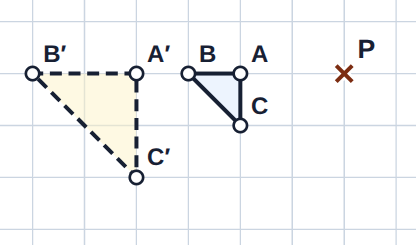
A triangle has vertices A(3, 1), B(5, 1) and C(3, 3). Enlarge it by scale factor 3/2 about P(1, −1).
From P to A is 2 right and 2 up. Multiplying by 3/2 gives 3 right and 3 up, so A′ is (4, 2). From P to B is 4 right and 2 up, giving 6 right and 3 up, so B′ is (7, 2). From P to C is 2 right and 4 up, giving 3 right and 6 up, so C′ is (4, 5). Join A′, B′ and C′.
Fractional scale factors
For scale factor 1/2, halve each distance from the centre. For 2/3, divide each distance by 3 and multiply by 2. For 3/2, divide by 2 and multiply by 3. A fractional scale factor can make a shape larger: 3/2 is greater than 1. The drawing questions are chosen so every image vertex lands on an integer grid intersection.
Finding a scale factor and centre
Divide an image side length by its corresponding original side length. For example, a side of length 6 mapping to a side of length 4 gives scale factor 4/6 = 2/3. Check another pair of corresponding sides. Always read the mapping direction: this worksheet maps shape A to shape B.
To find the centre, draw a straight line through an original vertex and its matching image vertex, then extend it. Repeat with another pair. Their intersection is the centre; check that the other pairs give the same point. On paired diagrams, shape A has vertices P, Q, R, … and shape B has matching vertices P′, Q′, R′, … . A selected centre is labelled O.
Describing an enlargement fully
Include all three essentials: the word enlargement, the scale factor and the centre coordinates. For example: “Enlargement, scale factor 1/2, centre (2, −1).” A centre alone or a scale factor alone is incomplete. You can enter exact equivalent fractions or decimals, such as 1/2 or 0.5.
Using the worksheet
For drawing questions, place A′, then B′ and the remaining image vertices. Select a vertex button to replace that point, or use Clear drawing to start again. Every label must match its original vertex. For the centre question, select one grid intersection; selecting another replaces it. With a keyboard, focus the grid, move the cursor with the arrow keys and press Enter to place a point.
Common mistakes
- Measure from the stated centre, not automatically from the origin.
- Multiply distances from the centre, rather than adding the scale factor.
- Use image length divided by original length, in the stated mapping direction.
- Count grid intervals, not grid lines.
- Keep each vertex label with its corresponding image point, even when the outline looks right.