
Probability trees - independent events
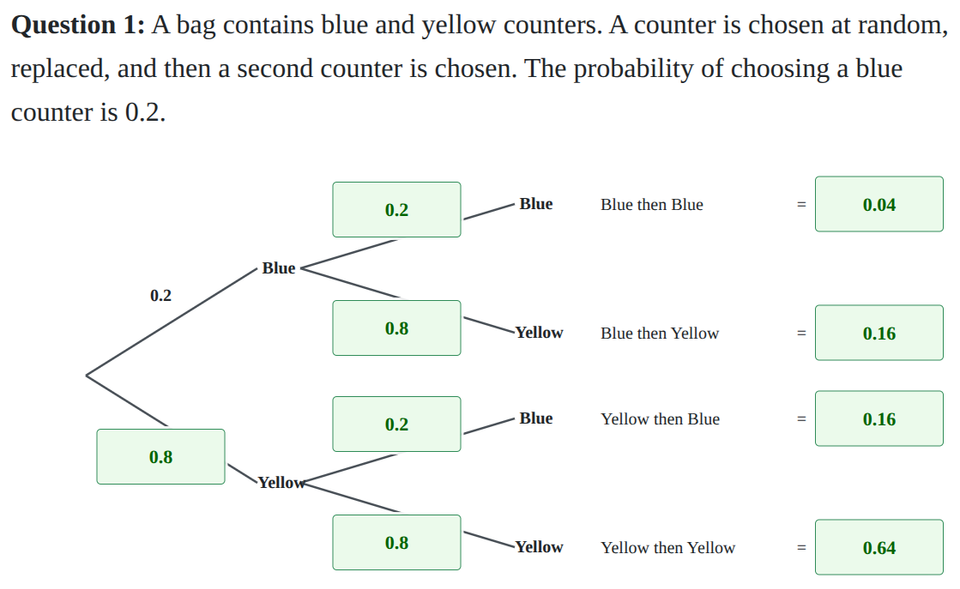
Probability trees are a great way to show repeated events. When an object is chosen and replaced, the probabilities stay the same for the second choice because the events are independent. Use this interactive worksheet to practise completing missing branch probabilities, calculating combined outcomes by multiplying along the branches, and answering related probability questions. Jump to the questions
Looking for questions on dependent events?
Practise now
Worksheet preview and key skills
Worksheet preview
This worksheet tests your ability to complete probability trees for independent events.
You will complete tree diagrams for scenarios involving replacement, and then calculate combined probabilities to answer follow-up questions.
What you’ll practise
- Completing missing branch probabilities for independent events.
- Multiplying along branches to find combined outcome probabilities.
- Adding outcome probabilities for "same colour" and "one of each" questions.
- Using the "at least one" shortcut method to save time.
Use the interactive worksheet below, or read the Topic guide for the method and worked example.
All answers should be given as decimals.
Topic guide
A probability tree is a diagram that shows all the possible outcomes of repeated events. Each branch represents a possible outcome, and we write the probability of that outcome on the branch.
Independent events
Events are independent if the outcome of the first event does not affect the outcome of the second event. A common example is choosing a counter from a bag and then replacing it before choosing a second counter.
Because the counter is replaced, the bag is exactly the same for the second choice. This means the branch probabilities for the second stage of the tree will be exactly the same as the first stage.
Completing branch probabilities
The probabilities on branches that split from the same point must always add up to 1. If you know the probability of choosing a red counter is 0.3, the probability of choosing a green counter must be 1 − 0.3 = 0.7.
Combined probabilities
To find the probability of a combined outcome (like choosing Red then Green), you follow the path along the tree and multiply the probabilities on the branches you pass.
- P(Red then Green) = P(Red) × P(Green)
Answering probability questions
Sometimes a question will ask for an outcome that can happen in more than one way. For example, "one of each colour" could mean Red then Green, OR Green then Red. To find the total probability, you calculate the probability of each path, and then add them together.
- Same colour: Add the probabilities for (Red, Red) and (Green, Green).
- One of each: Add the probabilities for (Red, Green) and (Green, Red).
- At least one Red: You can add (Red, Red) + (Red, Green) + (Green, Red). A quicker way is to use the shortcut: 1 − P(No Red), which means 1 − P(Green, Green).
Worked example
A bag contains blue and yellow counters. A counter is chosen, replaced, and a second counter is chosen. The probability of choosing a blue counter is 0.6.
Step 1: Complete the branches.
- Blue = 0.6.
- Yellow = 1 − 0.6 = 0.4.
- Because the counter is replaced, the second-stage branches are also 0.6 for Blue and 0.4 for Yellow.
Step 2: Calculate the combined outcomes by multiplying along the branches.
- Blue, Blue = 0.6 × 0.6 = 0.36
- Blue, Yellow = 0.6 × 0.4 = 0.24
- Yellow, Blue = 0.4 × 0.6 = 0.24
- Yellow, Yellow = 0.4 × 0.4 = 0.16
Step 3: Answer follow-up questions.
- Probability of two blue counters: This is just the "Blue, Blue" outcome: 0.36.
- Probability of one of each colour: Add "Blue, Yellow" and "Yellow, Blue": 0.24 + 0.24 = 0.48.
Common mistakes
- Adding instead of multiplying: Remember to multiply along the branches to find the combined outcomes. You only add at the end if you are combining multiple different paths.
- Forgetting to line up decimals: When multiplying decimals without a calculator, remember that 0.3 × 0.3 is 0.09, not 0.9!